Netlify's New Credit-Based Pricing: Why 20 Builds Per Month Wasn't Enough
A few months ago, I decided to host my application on Netlify. A friend recommended it as a great platform for hosting static sites, and I was eager to give it a try. What I didn't realize at the time was just how quickly I'd burn through my monthly credits. Let me break down the numbers for you.
In September of last year, Netlify transitioned to a new credit-based pricing model.
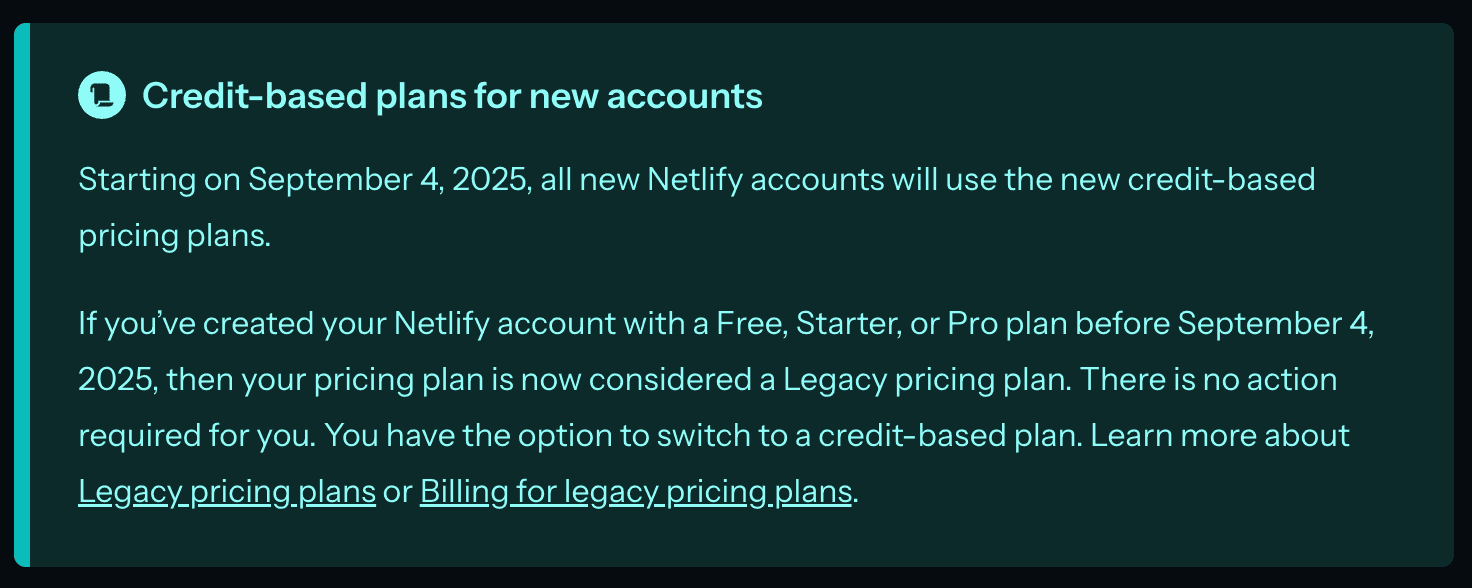
With the free tier, you get 300 credits per month, which you can use to deploy any framework within that limit (Netlify Docs).
I didn't look too closely at their pricing policy initially. I thought my builds weren't particularly heavy anyway — they averaged just over a minute each. What I didn't realize was that build minutes are no longer the metric that matters. Instead, each build costs 15 credits, which means you can only make 20 builds per month on the free tier. The silver lining? Failed builds don't count toward your credit allotment.
Note in the past with Netlify's legacy billing system, it was 300 minutes per month which would have taken you a lot further.
If you're someone who pushes frequent production deploys, this could be a deal breaker. That's exactly where I hit a wall—my app was a complete greenfield project, and I was committing and deploying constantly.
The good news is that deploys to feature branches don't consume your credits. So if you're comfortable with larger, less frequent releases to production, Netlify's model might work well for you. But for me, in the early stages of my project with rapid iteration, it simply wasn't sustainable.
Migrating from Netlify to AWS Amplify: Setup and DNS
I decided to give AWS Amplify a shot. Amplify is an AWS service designed to help you deploy applications quickly and easily. The initial setup was straightforward — I linked my GitHub repo, and there are plenty of guides available to help you configure Amplify for your specific project. The trickiest part was reconfiguring my DNS settings to point to Amplify instead of Netlify.
The Vendor Lock-In Trade-Off: AWS-Specific Serverless Functions
As my project grew, I needed to add serverless functions. (For context - serverless functions are small, stateless pieces of backend code that run only when invoked, without requiring you to manage a server). You keep them in your repo, and platforms like AWS, Netlify, or Vercel automatically spin them up and invoke them on demand.
Since my app is built with Gatsby, I could have used Gatsby's built-in Functions feature by storing my logic in the
/src/api directory which is exactly what I did initially. The catch? Gatsby Functions only work on hosting platforms
that support them. Once I moved to Amplify, I had to adapt to its specific structure for serverless functions.
How to Set Up Serverless Functions in AWS Amplify (Lambda)
I spent my Saturday afternoon trying to figure out how to configure serverless functions in Amplify. Instead of using
/src/api, Amplify requires you to create an amplify folder with the following structure:
amplify/
├── backend.ts
└── functions/
    └── name-of-your-service/
        ├── resource.ts
└── handler.ts- The
backend.tsfile is the main entry point for your Amplify Gen 2 backend where you register your functions. - The
resource.tsFunction configuration, e.g. env variables / secrets - The
handler.tsFunction code, a handler for your endpoint (runs on AWS Lambda)
- Defines which resources to deploy
- Configures the Function URL - Makes the Lambda accessible via HTTP
- Sets up CORS - Specifies which origins can call the function from the frontend
- Outputs the URL - Saves the function URL to
amplify_outputs.jsonafter deployment
When you push to your branch, here's what happens:
- Amplify builds the frontend (in my case, a Gatsby static site)
- Amplify deploys the backend (Lambda function via CDK)
- The Function URL is created and saved to
amplify_outputs.json - The frontend can read this file to retrieve the API URL
Netlify vs Amplify: Pricing, Build Times & Final Verdict
The main downside of using Amplify is that it tightly couples your project to AWS infrastructure. If you ever decide to migrate to another platform, you'll need to refactor all those serverless functions — which could be a significant undertaking.
On the pricing front, AWS charges per build minute, and you get 1,000 build minutes per month on the free tier. For Lambda functions, you get 1 million requests per month. Honestly, with my pet project, I'd be thrilled to get even 10 requests per month.
While vendor lock-in is a concern, I've learned a tremendous amount along the way. However, the biggest drawback I've encountered is the dramatic increase in build times. Remember how I mentioned my Netlify builds took just over a minute? When I first moved to Amplify, builds averaged around 2.5 minutes—nearly twice as long, but still manageable. Then I added one small Lambda function to my project, and my build time skyrocketed to 10 minutes. That's genuinely painful.
I'm not ruling out the possibility of moving back to Netlify in the future and using my 300 credits more strategically. For now, though, I'm sticking with Amplify and learning more how to optimize my builds.